
The modern web is an infinite stream of inspiration, but it is also a recipe for digital chaos. Between open browser tabs, scattered links in chat apps, and half-baked thoughts scribbled in random text documents, we are constantly losing track of the content that matters most.
Enter Rubra, a modern productivity application specifically engineered to bridge the gap between bookmark management and active note-taking. Rather than acting as a digital graveyard where links go to be forgotten, Rubra serves as a dynamic workspace for collecting, organizing, and sharing inspiration.
Why Rubra Excels
Most traditional bookmark managers only save raw URLs. Rubra redefines this experience by focusing on context, visual clarity, and collaborative execution.
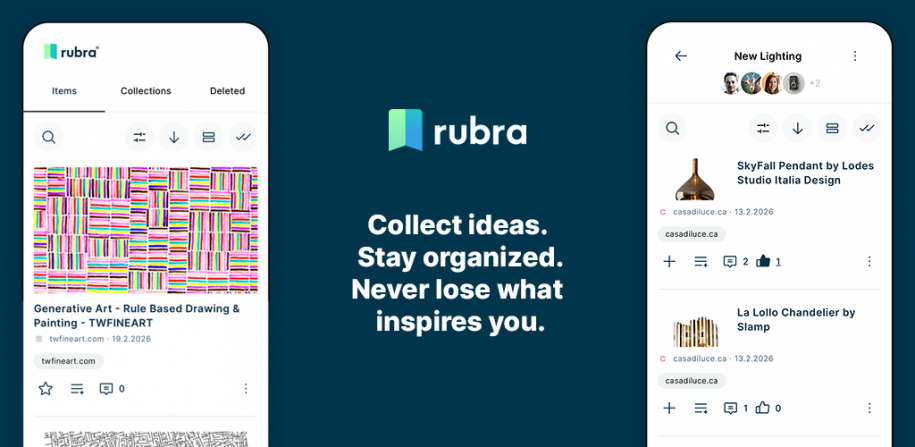
Visual Context with Previews: Instead of staring at a wall of uninviting text links, Rubra automatically generates visual previews of your saved bookmarks. This makes scanning through your saved resources intuitive and highly efficient.
Integrated Note-Taking: A bookmark is rarely just a link; it represents a thought or a task. Rubra lets you attach direct text notes to your bookmarks, allowing you to capture why you saved a link the exact moment it caught your eye.
Fluid Organization: Rubra features a flexible architecture utilizing tags and collections (including nested sub-collections). You can easily sort, filter, and surface exactly what you need without navigating deep, complex folder structures.
Seamless Collaborative Sharing: Unlike isolated browser bookmarks, Rubra allows you to create both private and public collections. You can invite teammates, friends, or your community to collaborate, view, and even comment on shared content.
For Whom Is Rubra a Perfect Fit?
Rubra is explicitly designed for individuals whose daily workflows rely on heavy digital curation, research, or creative output.
1. Content Creators and Influencers
For YouTubers, podcasters, bloggers, and streamers, managing the resources mentioned in their content can be a logistical headache. Instead of stuffing video descriptions or show notes with a chaotic, unformatted wall of raw URLs, creators can use Rubra to build a beautifully organized, public resource collection. By dropping a single Rubra link into their description, they provide their audience with a highly consumable, visually appealing hub where followers can easily explore sponsored links, research papers, gear recommendations, or inspiration boards.
2. Creatives and Designers
Visual thinkers need visual tools. Designers, mood-board creators, and multimedia artists constantly gather inspiration across different platforms. Rubra provides them with a unified, visually driven repository to save layout ideas, color palettes, and portfolio links alongside their own conceptual design notes.
3. Researchers, Students, and Writers
For anyone conducting academic or market research, a simple browser bookmark tool is insufficient. Researchers find Rubra highly rewarding for gathering reference papers, data sources, and articles. By combining the bookmark with embedded note-taking, they can summarize key findings directly on the resource card, streamlining the citation and writing process.
4. Project Managers and Small Teams
Teams frequently waste time hunting down shared links in fragmented Slack channels or emails. Rubra provides a central, real-time source of truth. Teams can map out project resources, share documentation, and collaborate on project boards without friction.
5. Lifelong Learners and Digital Curators
There is a massive audience of casual web surfers who double as passionate hobbyists—whether they are learning a new language, mastering cooking, tracking investment trends, or collecting DIY home improvement guides. For these everyday digital curators, Rubra acts as an external brain. It elevates the casual “read later” habit into a structured personal knowledge base, ensuring that valuable articles or video tutorials aren’t buried under a mountain of browser history.
Use Cases
Interactive Resource Hubs Content creators can post a single Rubra public collection link in their video descriptions. Users can view links cleanly and comment directly on specific tiers within the collection, building an active, permanent resource hub.
Project & Resource Curation Drop project links into shared collections. Teams can assign user roles, utilize sub-collections, and follow live updates.
Content Creation Pipelines Writers and content creators use Rubra to park ideas, draft article outlines in notes, and attach inspiration links directly to the concept.
Personal Digital Knowledge Bases Act as a personal “Read Later” archive and a digital brain, using clean tags to pull up recipes, code snippets, or long-form essays instantly.
Community Knowledge Sharing Create public collections to share industry insights, curated toolkits, or educational resource sets with friends or an online community.
Conclusion: Turning Information into Action
Ultimately, Rubra stands out because it treats bookmarks as active assets rather than passive data. By layering rich note-taking, tiered organization, and interactive features like user comments on top of a highly visual bookmarking system, it transforms a cluttered digital footprint into an organized, actionable ecosystem. Whether you are building a permanent resource hub for your online audience, managing professional projects, or just trying to tame your browser tabs, Rubra provides the ideal structure to keep your best ideas within arm’s reach.